 Saudi Arabia
 Kuwait
 Emirates
 Bahrain
 Oman
Oman Qatar
Qatar Iraq
Iraq Libya
Libya Morocco
 Jordan
 Turkey











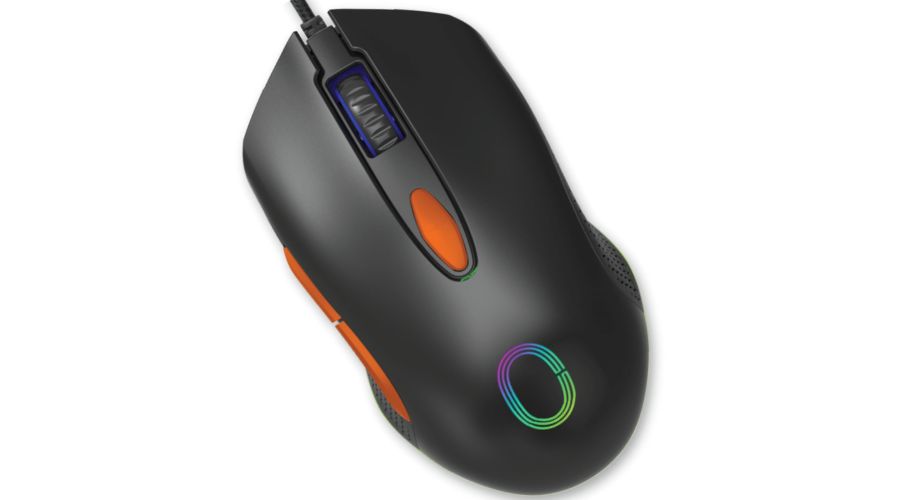
The best gaming mouse one that seamlessly blends comfort with high performance is the key element that can make a real difference in your gaming experience. Whether you're a professional player or an enthusiast striving for peak performance, choosing the right mouse goes beyond just looks or price. It involves critical factors like response speed, tracking accuracy, and comfort during long sessions helping you take full control of your gameplay without any obstacles. With so many options available, it's essential to understand the key criteria that ensure the perfect balance between top-tier performance and lasting comfort. That’s why we’re here to provide everything you need to know to choose the best gaming mouse, available now at GentooShop offering a diverse selection that meets the needs of players at every level.
What’s the Difference Between a Gaming Mouse and a Regular Mouse?
The difference between the two becomes clear when you consider how each is used, the level of control they offer, and how well they suit everyday tasks versus intense gaming sessions that demand higher speed and precision.
Response Precision & Sensitivity
-
The best gaming mouse features higher levels of sensitivity with multi-level adjustability, giving players more accurate and flexible movement during gameplay. A regular mouse, on the other hand, works well for general use like browsing and office work, but doesn't offer the same level of fine-tuned control needed for fast or precise in-game actions.
Speed Performance & Tracking Rate
-
Designed to handle rapid movements and consecutive commands more efficiently, the best gaming mouse delivers smoother, more stable tracking in situations requiring instant reactions. While a regular mouse performs its job well for daily tasks, it simply doesn't provide the same sense of speed and fluidity.
Number of Buttons & Extra Functions
Gaming mice come with additional programmable buttons, allowing users to execute multiple commands quickly all from one hand. Regular mice feature a simpler design with a limited number of buttons, making them practical for everyday use but far less flexible when repeated or varied commands are needed.
Ergonomic Design for Hand Comfort
Gaming mice are built with long-session comfort in mind, offering better grip support and finger stability during movement. Regular mice have a practical, straightforward design suitable for daily use, but they don't deliver the same level of comfort during intensive or continuous long-hour use.
Customization & Settings
The best gaming mouse gives users broader customization options such as sensitivity adjustments, button mapping, and sometimes different operating modes making it highly adaptable to personal playstyles. In contrast, regular mice focus on plug-and-play simplicity without advanced settings, which suits those who prioritize ease of use over customization.
Build Quality & Durability Under Heavy Use
Gaming mice are constructed with materials that withstand repeated pressure and intense usage, given the fast-paced nature of gaming. Regular mice are built to meet the needs of ordinary daily tasks and don't offer the same level of durability required for sustained, high-speed use.
Primary Purpose
Gaming mice are developed to assist users who need precision and control at high speeds in a real-time interactive environment every feature is performance-driven. Regular mice are the better fit for office work, studying, and browsing, where simplicity and practicality take priority over advanced features.
Key Technical Specifications That Determine the Quality of a Gaming Mouse
Technical specifications help you understand a mouse’s true performance level, revealing its ability to deliver consistent response, comfortable control, and reliable handling across different gaming demands.
Sensor Type & Resolution (DPI)
The sensor is one of the most critical components affecting mouse efficiency, as it’s responsible for tracking movement and translating it into precise on-screen commands. The more advanced the sensor, the smoother and clearer the cursor movement especially in situations that require quick aiming or accurate transitions between targets.
Polling Rate
Polling rate refers to how fast the mouse sends data to your device. It’s a key factor in reducing the delay between your physical movement and on-screen action. A higher polling rate contributes to a smoother experience and gives you a greater sense of control during fast-paced, high-stakes moments.
Tracking Speed (IPS)
Tracking speed reflects the mouse’s ability to keep up with rapid movement without losing accuracy or suffering response dropouts. This feature becomes essential when moving your hand very quickly. Players need that motion to be transferred correctly, without unwanted shaking or deviation.
Acceleration Rate
This factor shows how well the mouse handles sudden changes in speed during use. When the mouse moves extremely fast in a short amount of time, it must maintain signal precision and stability. Any weakness here leads to inaccurate movement that directly impacts in-game performance.
Adjustable Sensitivity (DPI Switching)
This feature gives users greater flexibility in controlling cursor speed based on the game type or personal playstyle. Having multiple adjustable levels allows you to switch between high precision for fine movements and higher speed for situations that demand broader, more dynamic response.
Switch Type & Lifespan
Switch quality affects how quickly and consistently clicks register especially with repeated use. It also reflects the mouse’s long-term operational life. The more clicks the switches are designed to withstand, the more reliable the performance and the lower the chance of response degradation over time.
Weight & Balance
Performance isn’t just about software it also involves the physical feel during movement. A mouse’s weight and balanced distribution impact ease of control and determine whether the mouse is better suited for fast flicks or for use cases requiring greater stability and precise handling.
How to Choose the Right Mouse Based on Your Favorite Game Genres
The ideal mouse choice changes depending on the types of games you prefer. Each genre demands a different control style, which directly affects the specs you should focus on when making a purchase.
Choose a Fast-Response Mouse for Shooter Games
Shooter games rely on precise movements and quick reflexes, so it's essential to pick a mouse that gives you smooth control and instant target-to-target transitions. This genre benefits from a lightweight mouse with stable tracking, because any delay or excess weight can hurt your aiming accuracy and reaction speed during combat.
Look for Extra Buttons in MOBA & Strategy Games
In games that require executing numerous skills and commands in a short time, extra buttons become a highly practical feature. They allow quick access to certain functions without relying entirely on the keyboard giving you greater flexibility and helping improve in-game decision-making.
Focus on the Balance Between Speed and Stability in Racing Games
Although racing games don’t always involve constant clicking, they do require balanced control and stable response when navigating menus or using certain control schemes. That’s why it’s best to choose a mouse that offers comfortable, precise movement with a simple, easy-to-use design without unnecessary complexity or over-the-top features.
Pick a Versatile Mouse If You Play Multiple Genres
Many players don’t stick to just one type of game. That’s where the importance of a well-rounded mouse comes in. A versatile mouse is the right choice when it combines comfort, a reasonable number of buttons, and adjustable settings that can be tailored to each game giving you a more balanced experience without needing to switch devices constantly.
Pay Attention to Mouse Weight Based on In-Game Movement Style
Weight preferences vary from player to player, but the game genre plays a major role in this choice. Games that rely on fast, continuous movement are better suited to a lighter mouse, while some users prefer more weight for games that demand calm, steady control. So, keep this factor in mind relative to your usual playstyle.
Set Your Priorities Before Buying Don't Focus Only on Looks
Flashy designs or RGB lighting might catch your eye, but the right choice starts with knowing the game genres you spend most of your time on. Once you identify your actual needs first, it becomes much easier to pick a mouse that effectively supports your playstyle rather than buying something that looks great on the outside but doesn't deliver the performance you need in real use.
Best gaming mouse
cypher Optical Gaming Mouse
-
Product Name: cypher Optical Gaming Mouse
-
Brand: cypher
-
Type: Optical Gaming Mouse
-
Interface: USB Powered
Key Features:
-
Smooth & Comfortable Glide – Enjoy effortless, fatigue-free movement during long gaming sessions.
-
High-Performance Precision Control – Engineered for accurate tracking and reliable response.
-
Adjustable Sensor with DPI Precision – Fine-tune sensitivity to match your playstyle.
-
Large Mouse Wheel – Designed for easy, tactile scrolling.
-
Professional Gaming Chip – Sunplus SPCP199 – Built with dedicated gaming-grade components for consistent performance.
-
Adjustable Lighting - Turn the light on or off according to your preference.
cypher Vortex Gaming Mouse
-
Product Name: cypher – Vortex Gaming Mouse
-
Brand: cypher
Key Features:
-
Dynamic RGB Lighting – Features moving RGB light effects with an On/Off button conveniently located on the underside of the mouse.
-
6 Programmable Buttons – Customize commands to match your gameplay.
-
Adjustable DPI with 4 Levels – Up to 4800 DPI (expandable to 7200 DPI when using macro mode).
-
Large Comfortable Scroll Wheel – Designed for smooth and easy scrolling.
-
Mechanical Macro – Built to enhance gaming performance.
-
USB Plug & Play – No complicated setup required.
System Requirements (What You Need to Run the cypher Gaming Mouse):
-
Supported Operating Systems: Windows 2000 / XP / Windows 7 / Windows 8 / Windows 10 / Vista (32-bit or later)
-
Powered USB Port
-
Internet Connection & 100MB Free Hard Disk Space (required for optional software download)
FAQ
Does the type of mouse surface affect performance?
Yes, the surface you use plays an important role in movement smoothness and stability. Some surfaces provide lower friction for faster movement, while others offer more precise control during slow, deliberate motions.
Can I use the best gaming mouse for everyday work?
Absolutely. It works perfectly for browsing and office tasks. In fact, it delivers a more flexible experience thanks to its high precision and the ability to customize certain functions to streamline repetitive tasks.
Does size affect the user experience?
Choosing the right size is essential. A mouse that's too small or too large can cause discomfort or make control difficult. That's why it's best to pick one that matches your hand size and grip style.
Does a gaming mouse require special drivers?
Some models work right out of the box with no setup needed, while others come with dedicated software that gives you broader control over features this is especially useful for those seeking more detailed customization.